.png)
 1 hour ago
8
1 hour ago
8
Crimson Desert’s patch v.1.04.00 allows players to now tame birds. Moreover, one particular bird that has caught everyone’s attention is the Iron Eagle bird, found in the database but not in-game yet. Still want to get your hands on it? It’s about time you installed the Iron Eagle mod, which has caught the attention of the community for a reason; it swaps the in-game Phoenix with the unfound bird. Here’s how you can use it for yourself.
Crimson Desert Iron Eagle Mod Installation Guide
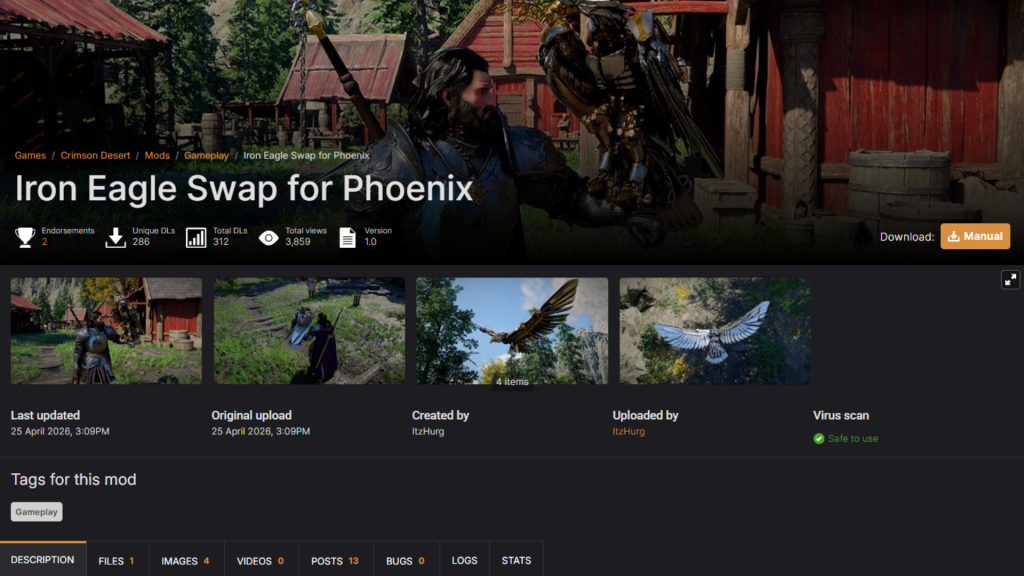 The Iron Eagle mod swaps Phoenix for the bio-mechanical bird | Credit: Nexus Mods
The Iron Eagle mod, available on Nexus Mods, is a straightforward cosmetic swap created by modder ItzHurg. It replaces the Phoenix in-game with the Iron Eagle’s appearance, so you get to walk around with the iconic bio-mechanical bird as your companion instead of the flame-feathered bird.
Here’s how to install it:
- Step 1 – Download the Mod: Head over to Nexus Mods and download the ZIP file manually.
- Step 2 – Set Up the JSON Mod Manager: If you haven’t already, download and install the JSON Mod Manager, which is the recommended tool for managing Crimson Desert mods.
- Step 3 – Install the Mod: Once you have both the ZIP file and the JSON Mod Manager ready, the installation is rather simple. Open the JSON Mod Manager, then drag and drop the downloaded ZIP File directly into it. The manager should handle the rest automatically.
- Step 4 – Launch the Game: Start the game as normal. If the mod is installed correctly, the Phoenix in-game should now start displaying as the Iron Eagle.
That’s all it takes; it’s one of the simpler mods available for Crimson Desert right now, which also makes it a great starting point if you are new to the game.
How to Tame a Phoenix in Crimson Desert
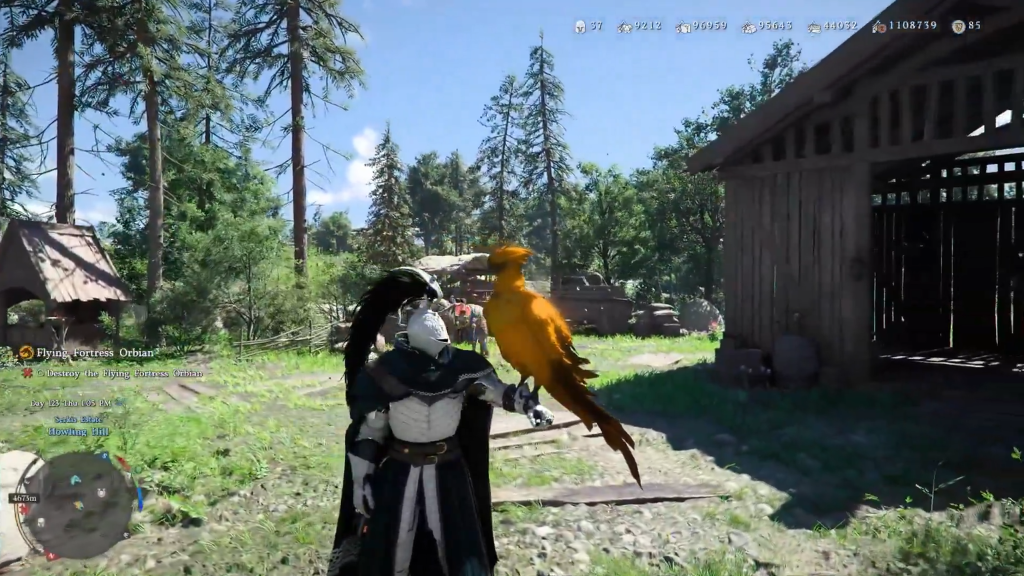 Here’s how to tame a Phoenix in-game | Credit: Pearl Abyss (@SicklyTheNinJa/X)
Since the Iron Eagle mod swaps the Phoenix’s appearance, you’ll first need to actually obtain the Phoenix pet in-game. Unlike regular birds, the legendary Phoenix also requires a completely different approach, with you required to kill it first.
Where to Find the Phoenix
The Phoenix is located in the Trader’s Expanse region, in the northeastern part of the Crimson Desert map. Look for it south of the Trader’s Expanse. If it’s not there when you arrive, use the nearest Abyss Nexus fast travel point to reload the area and wait a couple of minutes for it to appear.
Make sure that before heading out, you have a bow with explosive arrows as well as the Charged Shot skill equipped for accuracy. Once you spot it in the sky, equip your bow and use Charged Shot with explosive arrows to bring it down.
How to Craft the Pet Sigil
After the Phoenix falls, approach its body and skin it to receive a Phoenix Feather. Take this feather to any witch NPC and select the Craft Abyss Gears menu. Navigate to the Special Items tab and craft the Sigil of Solidarity (Phoenix). The cost of doing the same is the feather collected earlier.
Once done, open your inventory, select the Sigil, and use it to instantly add the Phoenix to your pet roster. To summon it, open your inventory, go to the Pets sub-tab, and select the Phoenix to spawn it.
And with the aforementioned mod installed, your Phoenix will look like the armored, bio-mechanical Iron Eagle instead.
| Crimson Desert Release Year | 2026 |
| Publisher | Pearl Abyss |
| Developer | Pearl Abyss |
Ready to take to the skies before everyone else? Try out the Iron Eagle mod and see what the hype’s all about.




























 Bengali (BD) ·
  English (US) ·