.png)
 1 hour ago
13
1 hour ago
13
The Remote Buy upgrade in Sell Lemons eliminates one of the biggest inconveniences during the playthrough, which is moving around from one button to another. Even buying the ‘Run Faster’ upgrade isn’t enough to cover all the departments quickly. To help players with that, the developers have added this feature that lets you buy the next upgrade without moving an inch from your place.
The only thing that stands in your way is the affordability of Remote Buy in Sell Lemons. While it can be purchased instantly using Robux, it’s always advised to go easy on your pocket and use the free-to-play method. Our guide explains how to purchase the Remote Buy upgrade in this Roblox game without using Robux. So if you are on a financial diet, this method will suit you well.
How to Unlock and Use Remote Buy in Sell Lemons
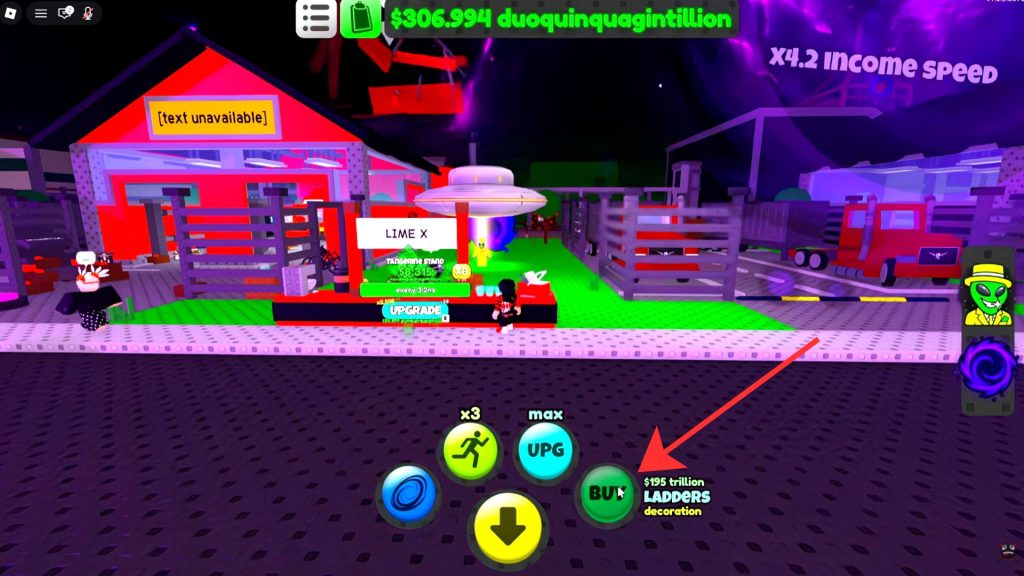 The Remote Buy button | Image via Brockenskull Gaming/YouTube/BloxByte Games
The easiest and quickest way to get the Remote Buy upgrade is by spending Robux. You can get it for 479 Robux right now. However, if you don’t want to use the premium currency, you can also use investors to buy it. For that, you will have to spend 1 Trigintillion investors, which is a lot if you have just started playing.
Note: You earn investors by rebirthing in Sell Lemons. This mechanic is unlocked once Joe the alien shows up at your base.
You will need multiple rebirths and evolutions to reach this many investors. It is said that you must get at least six evolutions to unlock this upgrade. It appears in the Power menu when you click the green notepad button at the top of the screen. The menu has multiple powers that can be bought using investors, so buy them according to your preference.
Once you have bought this upgrade, you will unlock a ‘buy’ button at the bottom of the screen. Clicking on this button will let you purchase the next upgrade on your tycoon. What’s best is that you won’t have to move from your current place to do that. This makes the gameplay feel more convenient because climbing up and down from the Hill Expansion feels a lot more hectic.
It took us dozens of rebirths and half a dozen evolutions to finally acquire Remote Buy in Sell Lemons. After that, it became extremely easy to upgrade the base. It felt like the journey from Lemon Stand to Lemon Robotics, Lemon Republic, and Launchpad was cut short by a big margin.
One more thing, Remote Buy puts a minor restriction on the way you construct your base. Earlier, you could choose to purchase any button. However, with this option available, you can purchase only the buttons that it tells you to purchase. If you have loads of money, it won’t matter. But if you are running low on funds, you will have to buy the important upgrades manually first. That’s a small drawback, but overall, Remote Buy is a huge help, as it saves a lot of time traveling across the base.
All Other Powers in Sell Lemons
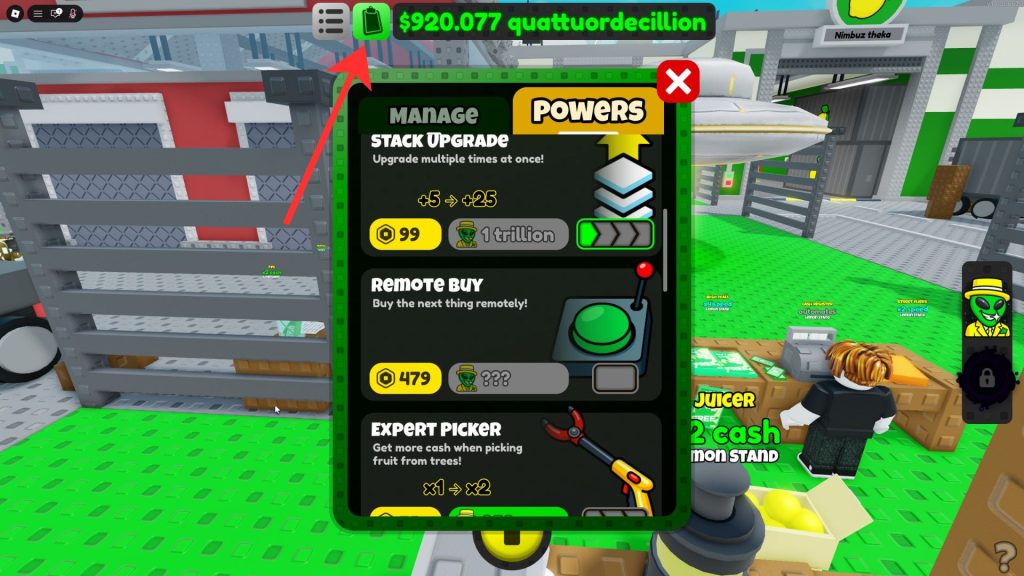 The Power menu in Sell Lemons | Image via BloxByte Games
You can buy the following powers by clicking on the notepad button at the top of the screen:
- Manage: 100 Investors
- Run Faster: 400 Investors for 1.5x speed, 1 Billion Investors for 2x speed, 1 Octillion Investors for 3x speed, and 1 Tresvigintillion Investors for 4x speed.
- Stack Upgrade: 1000 Investors for +5 upgrades, 1 Trillion Investors for +25 upgrades, 1 Decillion Investors for +100 upgrades, and 1 Vigintillion Investors for maximum upgrades.
- Expert Picker: 250 for 2x fruit value, 1000000 Investors for 4x fruit value, and 1 Quintillion Investors for 8x fruit value.
To purchase the above powers or upgrades, you will have to spend investors. You can only afford this currency if you have rebirthed through Joe the alien in this game. A general thing to remember about investors is that they also increase your income gains. So rebirthing is a wise choice in the long run.
While you are gradually earning money, make sure to complete other quests like finding the UFO Key and Sewer Key. Completing them rewards you handsomely! Apart from that, let us know in the comments if you need help with something else.



























 Bengali (BD) ·
  English (US) ·