.png)
 14 hours ago
13
14 hours ago
13
The Megaphone in Grow a Garden 2 is a fun gear item that lets players play music and sounds in-game using Roblox Sound IDs. It can make your overall experience even better, especially if you want to be a nuisance to your neighbors or troll other players before stealing crops from their garden. With that said, let’s take a look at how you can get your hands on the Megaphone in Grow a Garden 2.
How to Get the Megaphone in Grow a Garden 2?
-

Credits: Strawberreh Squad
-

Credits: Strawberreh Squad
-

Credits: Strawberreh Squad
-

Credits: Strawberreh Squad
-

Credits: Strawberreh Squad


As we mentioned earlier, the Megaphone in Grow a Garden 2 is a gear item, which means you can purchase it from the Gears Shop in the central hub for 8,000 Sheckles. The best part is that this item is always available in the Gear Shop, so you do not need to wait for restocks or any special events. If you have 8K Sheckles to spare, purchase the Megaphone from the Gears Shop NPC without hesitation.
Another advantage is that the Megaphone will be a permanent addition to your inventory after you purchase it, so you do not need to keep buying it repeatedly. It’s a one-time investment, and once you’ve purchased it, it’s yours to keep forever. However, you’ll need to keep visiting George, the Gears Shop NPC, to equip and unequip the Megaphone from your inventory.
Once you’ve purchased the gear, it should be automatically added to your quick inventory. Press the hotbar slot assigned to it, and the white, red, and yellow Megaphone should appear in your hands.
How to Use Roblox Sound IDs With the Megaphone in Grow a Garden 2?
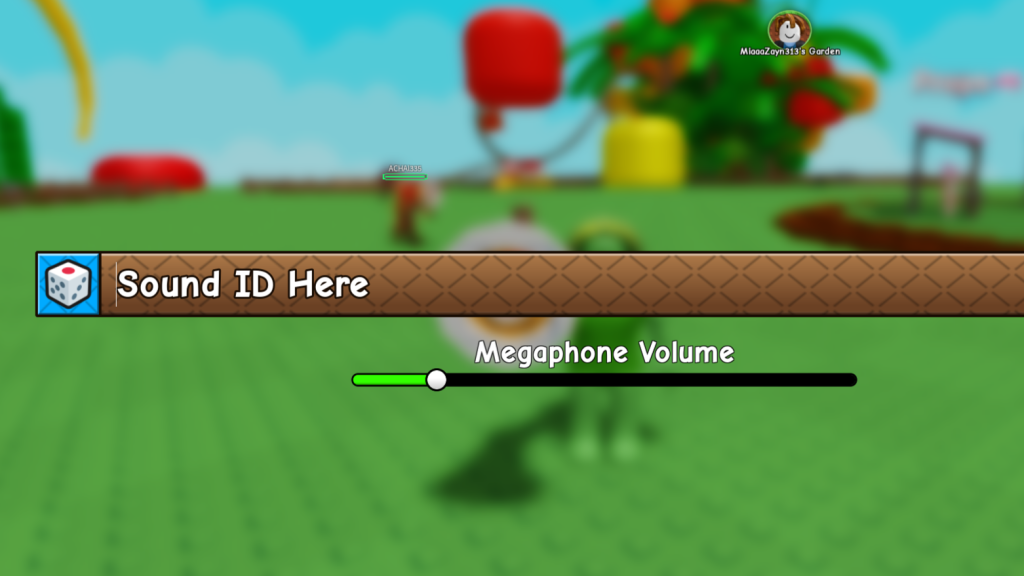 Play your favorite sounds and music with the Megaphone! | Credits: Strawberreh Squad
After you’ve equipped the Megaphone in Grow a Garden 2 and it’s in your hands, click the gear icon on the right side of the screen to open the Megaphone configuration menu, which includes the Sound ID input bar and the Megaphone Volume slider to adjust its volume.
Enter a Roblox Sound ID or music code in the bar, and press Enter on your keyboard. Then close the textbox, and while holding your Megaphone, click on it to play your desired song or sound. Adjust the volume using the slider below the bar in the configuration menu. If you don’t have a Sound ID, press the dice icon beside the ID box to generate a random code.
When you play your selected music or sound, the Megaphone briefly enlarges before returning to its original state. For players wanting to find more sounds and music, follow the steps below:
- Head to the Roblox website and click on “Create”.
- Go to the store by clicking on the “Store” option on the left.
- Click on the “Audio” option under “Categories”.
- You’ll find plenty of trending music and sound effects.
- Click the sound you want to use, then press “More info”.
- Click on the three-line dotted icon on the top right and copy the Asset ID.
- Return to Grow a Garden 2 and paste the copied Asset ID in the Megaphone Sound ID box.
Press Enter on your keyboard, then click on the Megaphone while holding it to play the music or sound. Yes, if you were wondering, the Megaphone is completely worth the price for annoying other players in Grow a Garden 2.
Sure, it won’t help you master the gameplay loop, but it’s a hilarious gear regardless. Not only is it relatively cheap and a permanent addition, but you can blast your favorite songs or sounds to troll other players before stealing their plants, or use them to announce your presence while they’re busy stealing your crops.
| Game | Grow a Garden 2 |
| Developer | Strawberreh Squad |
| Release Date | June 12, 2026 |
So, have you purchased the Megaphone in Grow a Garden 2 yet? Do you think it’s worth it? Let us know your thoughts and opinions on it in the comments section below.
























/https%3A%2F%2Fsportsmole-media-prod.s3.gra.io.cloud.ovh.net%2Fuploads%2F2026%2F06%2Frio-ngumoha-email-sportmole-6a27b73e9a471352625861.png)
 Bengali (BD) ·
  English (US) ·