.png)
 12 hours ago
11
12 hours ago
11
Gears in Grow a Garden 2 are utility tools that can either improve your garden or help you stop potential intruders from stealing crops. As you progress through the game and harvest more valuable crops, you’ll realise that you have to invest in gear like Sprinklers and Gnomes to grow your plants quicker and prevent other players from raiding your garden at night, respectively.
So purchasing gear from the Gears Shop is essential for mastering the gameplay loop. With that said, here are all the gears in Grow a Garden 2 and their effects.
Complete List of All Gears in Grow a Garden 2
-

Credits: Strawberreh Squad
-

Credits: Strawberreh Squad
-

Credits: Strawberreh Squad
-

Credits: Strawberreh Squad
-

Credits: Strawberreh Squad


Here’s a full list of all the gears currently available in Grow a Garden 2, including the ones available in the Robux store:
| Common Watering Can | Common | Boosts plant growth | 2,000 Sheckles |
| Common Sprinker | Common | Boosts plant growth speed and luck | 3,000 Sheckles |
| Sign | Common | Displays messages | 4,000 Sheckles |
| Uncommon Sprinker | Uncommon | Boosts plant growth speed and luck | 10,000 Sheckles |
| Vine Wrapper | Uncommon | Wraps players in vines | 499 Robux |
| Trowel | Rare | Lets the player move plants and replant them | 1,000 Sheckles |
| Rare Sprinkler | Rare | Boosts plant growth speed and luck | 80,000 Sheckles |
| Jump Mushroom | Rare | Temporarily increases jump height | 1,800 Sheckles |
| Speed Mushroom | Rare | Temporarily increases movement speed | 1,500 Sheckles |
| Megaphone | Rare | Plays music and sounds using Roblox Sound IDs | 8,000 Sheckles |
| Lantern | Rare | Offers light and enhances visibility at night | 12,000 Sheckles |
| Power Hose | Rare | Sprays players from a distance | 299 Robux |
| Freeze Ray | Rare | Freezes players | 749 Robux |
| Shrink Mushroom | Epic | Temporarily shrinks the player | 10,000 Sheckles |
| Supersize Mushroom | Epic | Temporarily enlarges the player | 20,000 Sheckles |
| Gnome | Epic | Protects the garden from intruders | 100,000 Sheckles |
| Flashbang | Epic | Blinds and stuns players | 20,000 Sheckles |
| Basic Pot | Epic | Allows the player to pot plants and keep them in the garden/inventory | 300,000 Sheckles |
| Legendary Sprinkler | Legendary | Boosts plant growth speed and luck | 1,200,000 Sheckles |
| Invisibility Mushroom | Legendary | Temporarily turns the player invisible | 30,000 Sheckles |
| Teleporter | Legendary | Teleports the player forward | 60,000 Sheckles |
| Wheelbarrow | Legendary | Picks up other players | 500,000 Sheckles |
| Player Magnet | Mythic | Pulls other players towards | 7,000,000 Sheckles |
| Super Watering Can | Super | Boosts plant growth speed | 1,000,000 Sheckles |
| Super Sprinkler | Super | Boosts plant growth speed and luck | 3,000,000 Sheckles |
| Rainbow Carpet | Super | Allows the player to fly around the lobby | 599 Robux |
How to Purchase Gears in Grow a Garden 2?
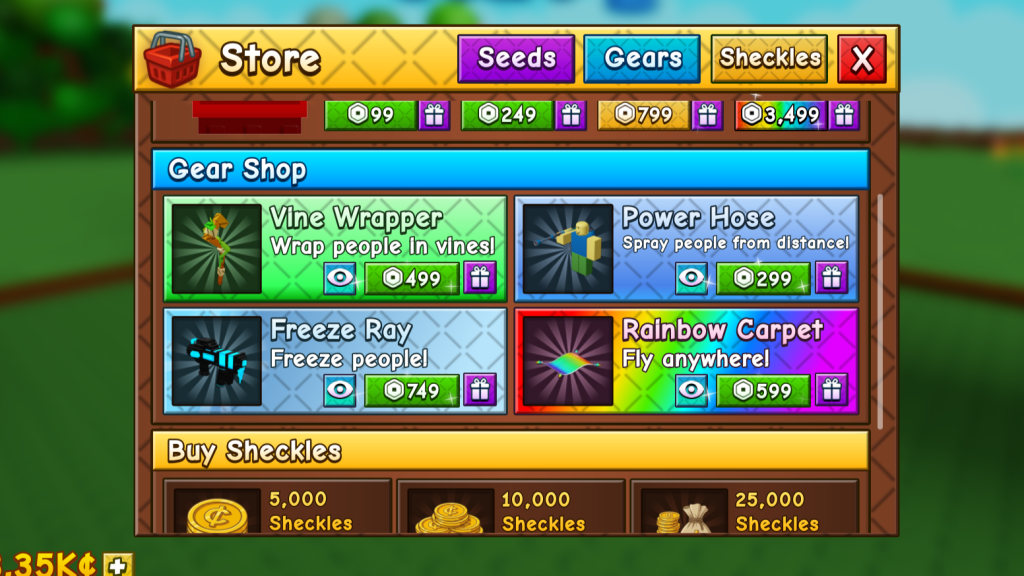 Purchase exclusive gear from the in-game store! | Credits: Strawberreh Squad
I. Gears Shop
We’ve already mentioned earlier that you can purchase Gears from the Gears Shop in Grow a Garden 2, located at the central hub. Head there and purchase any gear that you want from George for Sheckles. However, the Shop restocks its inventory and quantities randomly every 5 minutes, except for the Megaphone and the Player Magnet, which are always available for purchase.
You might not find the gear you’re looking for, so wait for the Gear Shop to restock its inventory and check again to see if they’re available.
II. In-Game Store
The Robux store in Grow a Garden 2 is located inside the red basket icon in the top-left corner of the screen. This store offers access to exclusive gear in exchange for Robux, so consider it a premium shop. While you don’t need to spend Robux to protect your garden, these gears have unique effects that aren’t found in the ones available in the Gears Shop.
Additionally, you can gift these gears to other players inside a server to help them out in their gardening endeavours. But spending Robux isn’t necessary, as you’ll be able to defend your garden and grow your plants just fine with the gears available in the Gears Shop.
So, what’s your favorite gear in Grow a Garden 2? Let us know your picks and opinions in the comments section below.

























/https%3A%2F%2Fsportsmole-media-prod.s3.gra.io.cloud.ovh.net%2Fuploads%2F2026%2F06%2Frio-ngumoha-email-sportmole-6a27b73e9a471352625861.png)
 Bengali (BD) ·
  English (US) ·