.png)
 2 hours ago
11
2 hours ago
11
Forza Horizon 6 gives you an enormous garage and, eventually, the very human urge to share some of it with the people you play with. The problem is that the game’s approach to car gifting is a little more complicated than just opening a menu and typing in a friend’s name to send them a trade offer.
There is an official Gift Drop feature in the game, and there is also a trick for getting a specific car to a specific friend through the Auction House. Both require a bit of setup, and neither works quite the way most players assume going in.
On that note, here is everything you need to know about gifting cars to your friends in FH6.
How Car Gifting Actually Works in Forza Horizon 6
-

Credits: Playground Games/FandomWire
-

Credits: Playground Games/FandomWire
-

Credits: Playground Games/FandomWire
-

Credits: Playground Games/FandomWire
-

Credits: Playground Games/FandomWire
-

Credits: Playground Games/FandomWire

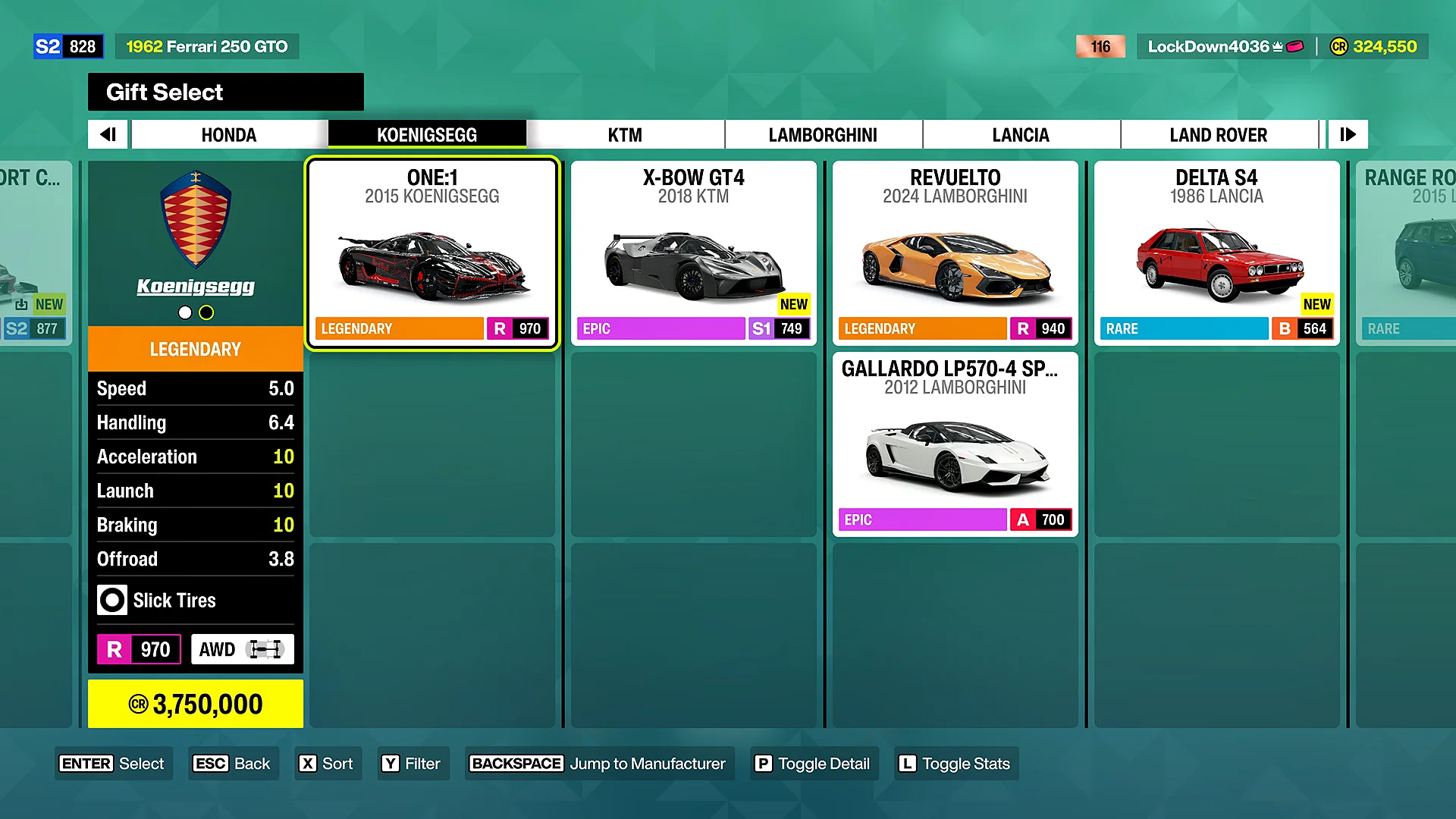


Gift Drop is the official gifting system in Forza Horizon 6, but it is not a direct “transfer” feature.
You are not sending a car to your friend, but to a randomly selected player from a category you choose, and the identity of that recipient is never revealed to you. You might also be on the receiving end yourself if another player’s gift lands in your direction.
There are two ways to trigger the Gift Drop menu:
- The first is through the Pause Menu: head to the Cars tab and look for the Gift Drop option there.
- The second is by visiting any Barn Find location on the world map, which also gives you access to the Gift Drop interface once you are outside the barn in your car and hit the action button when prompted.
Once you are in the Gift Select menu either way, the process from there is the same:
- Select the car you want to gift from your garage.
- Choose your recipient category: Anyone, New Players, New Horizon Legends, Returning Players, or Community Contributors.
- Pick a message to send along with the gift from the available options.
- Choose how to sign it: Your Player Name, Your Gamertag, or just leave it Unsigned.
- Confirm the final prompt, and the car leaves your garage.
How to Give a Specific Car to a Friend in Forza Horizon 6
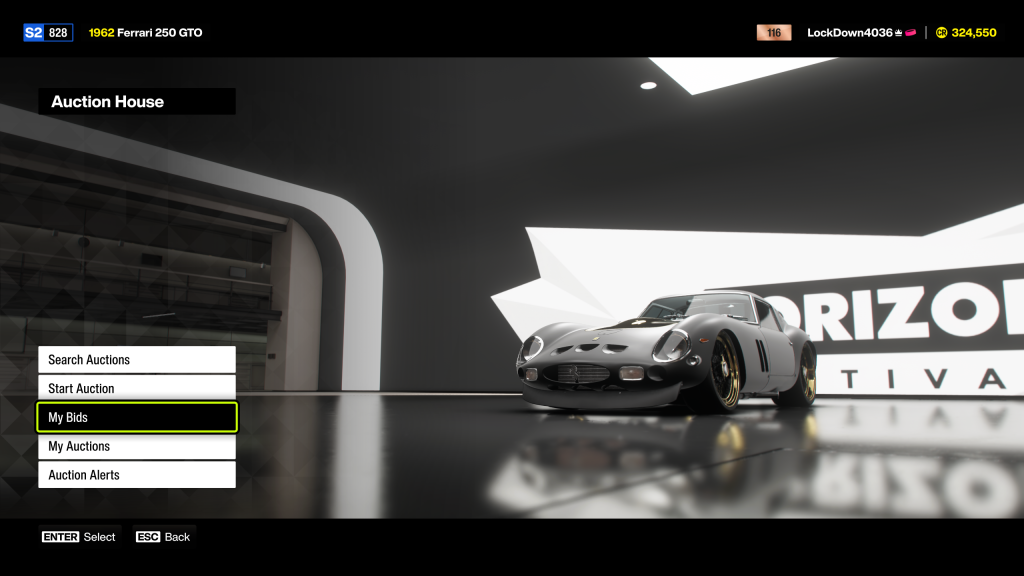 The good ol’ “market sniping” trick. | Credits: Playground Games/FandomWire
Since Gift Drop does not let you target a specific person, the only way to transfer a car directly to a friend is through the Auction House. Technically speaking, this is obviously not an official “gifting” mechanic.
It is more of a “well-coordinated sale,” in that it requires both of you to be ready at the same time, ideally on a call together, because the window to pull it off can be quite narrow, especially if it’s on the list of the rarest/fastest cars in Forza Horizon 6. The moment a listing goes live, anyone browsing the Auction House can snipe it before your friend gets there.
Setting a reasonable buyout price matters here: too low and you are practically advertising a bargain to strangers, too high and your friend cannot afford it. Agree on the price beforehand and make sure your friend has the funds ready. After that, here are the steps to follow from your end:
- Go to Buy & Sell in the main menu and select Auction House.
- Select Start Auction, choose the car you want to transfer from your garage, and hit Auction Car.
- Set the Buyout price you and your friend have agreed on.
- Give your friend a countdown before you confirm the listing, so they are already in the Auction House searching when it goes live.
And for your friend’s end:
- Before heading into the Auction House, buy the base Peel P50 from the Autoshow if you do not already own one, and get into it. This is a well-known community trick: having the Peel P50 as your active car loads the Auction House menu noticeably faster than other cars due to its minimal asset weight.
- From the Auction House, go to Search Auctions and use the Filter options to narrow down to the exact car being listed.
- Have the search ready to fire the moment your friend counts down to zero.
- When the listing appears, identify it by the seller’s name, press Y on your keyboard or controller, select Buyout, and confirm immediately.
Here’s a quick summary of both methods side by side:
| Gift Drop | Random player from the chosen category | None | No |
| Auction House | Specific friend | Yes, real-time | Not guaranteed, but manageable with timing |
And finally, some things around the topic that are worth clarifying:
Can you gift cars to a specific friend directly in Forza Horizon 6?
There is no official mechanic for a direct player-to-player car transfer in the game. Gift Drop sends to a random recipient from a chosen category, and the Auction House method is the closest workaround available for reaching a specific friend.
Is the Auction House method safe for rare or high-value cars?
It carries risk since any other player can “snipe” the listing. Setting a higher Buyout price reduces that risk considerably, and having your friend ready to search and buy the instant the listing goes live minimizes the window other players have to act.
Does using Gift Drop cost you anything besides the car itself?
No additional fee or in-game currency is required. You simply lose the car from your garage upon confirming the gift.
Can you choose a specific friend as the Gift Drop recipient?
No. The recipient categories available are “Anyone,” “New Players,” “New Horizon Legends,” “Returning Players,” and “Community Contributors.” There is no option to name a specific player.
Have you managed to successfully transfer a car to a friend through the Auction House, or did someone snipe it before they could get there? Let us know how it went in the comments below.



















 Bengali (BD) ·
  English (US) ·